
For six years, one free electron configuration simulation did exactly what I needed it to do.
Students built increasingly complex atoms by adding orbitals and electrons. As they worked, a filled orbital diagram developed beside the three-dimensional model. My lesson then asked them to connect those representations to electron configurations and infer the rules that organized all three.
Then the simulation disappeared.
That’s always the risk when we build a lesson around technology we don’t own. But I didn’t want to replace this experience with notes, a video, or a worksheet showing students how to fill orbital diagrams. The original lesson worked because students performed the sequence themselves, noticed the patterns, and made sense of the models together.
So I rebuilt the simulation in Genially—and used the opportunity to solve several instructional problems I had tolerated in the original version.
This article walks through the updated electron configuration interactive, the lesson-design decisions behind it, and the larger process any science teacher can use when a valuable digital resource disappears or never quite fits the learning in the first place. It’s one of many examples of how interactive science simulations can serve inquiry-based chemistry lessons without turning the technology itself into the point of the lesson.
Table of Contents
- Why the Original Electron Configuration Simulation Mattered
- What the Original Interactive Left Out
- Design the Student Action Before Rebuilding the Technology
- How the New Electron Configuration Interactive Works
- How the Updated Electron Configuration Simulation Changed the Lesson
- Support Students Without Removing the Inquiry
- Embed the Genially Simulation in a Complete Digital Lesson
- What to Do When a Science Simulation Disappears
- Use This Electron Configuration Activity in Your Classroom
Why the Original Electron Configuration Simulation Mattered
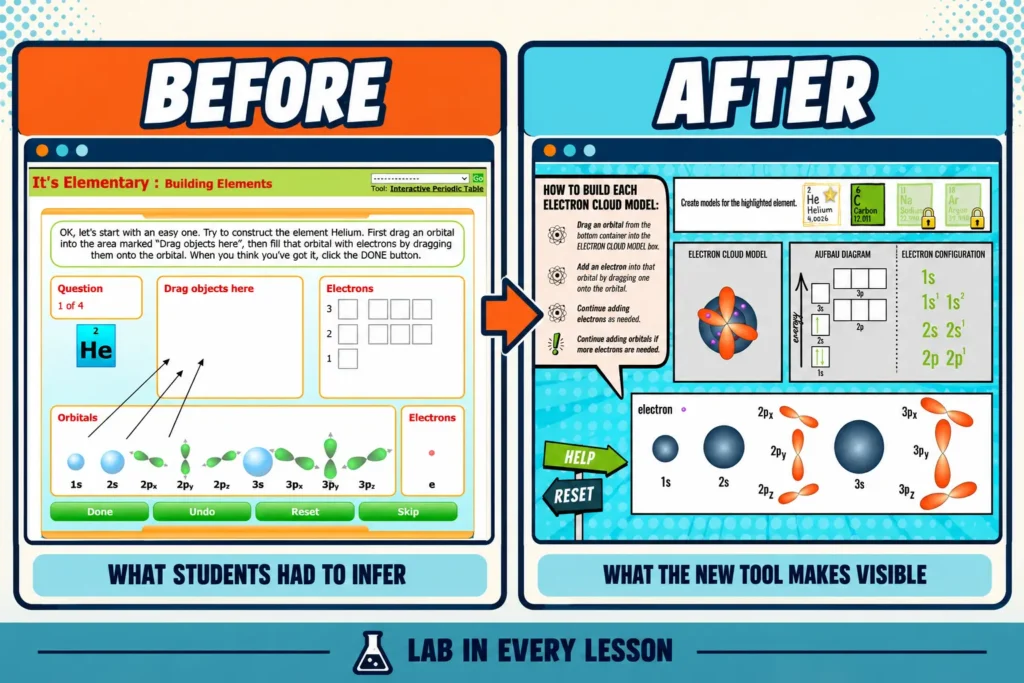
The old simulation was created by Annenberg Learner. It allowed students to build atoms through the third energy level by dragging orbitals and electrons to create a three-dimensional representation. As students added electrons, the corresponding arrows appeared in an orbital box diagram.
That mattered because an electron configuration is only one of multiple ways we can represent atomic structure.
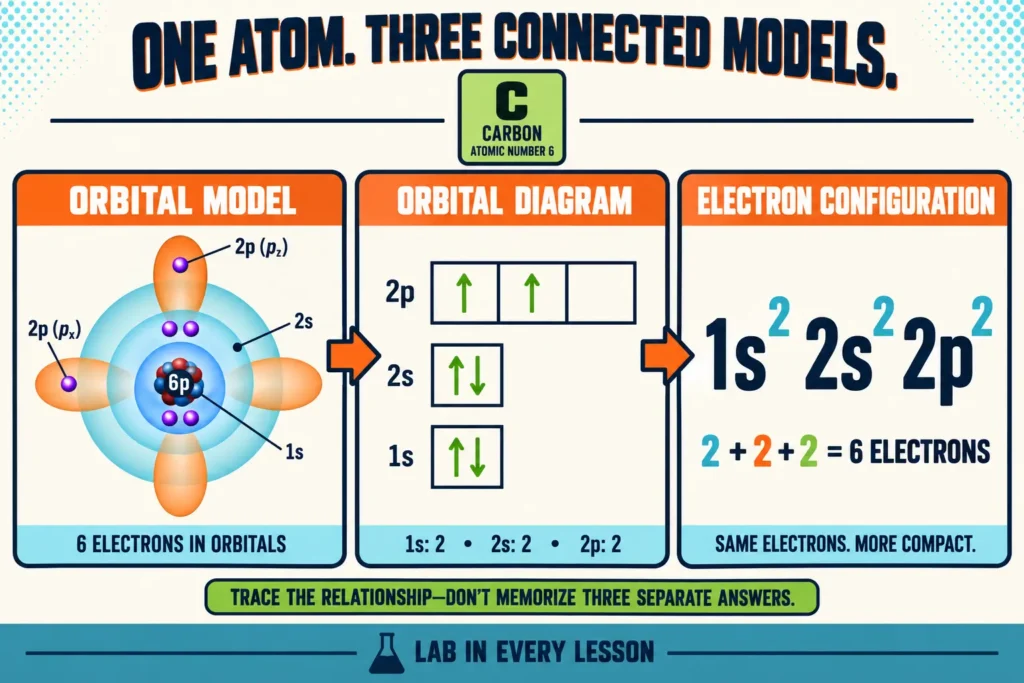
Students should be able to connect several representations of the same electron arrangement:
- the shapes and relative positions of orbitals in an electron-cloud model
- the boxes and arrows in an orbital diagram
- the numbers, letters, and superscripts in an electron configuration
When those representations are taught separately, students can learn three procedures without understanding how they describe the same atom. The interactive gave students a way to build one model and watch another emerge. My surrounding lesson added the third representation and asked students to identify the relationships among them.
The most important feature of the original electron configuration simulation was not the animation. It was the action: students placed orbitals and electrons in a sequence, encountered limits, and repeatedly built larger atoms until the organizing patterns became visible.
The simulation mattered because students were building the models — not watching me demonstrate how the models should be built.
What the Original Interactive Left Out
The original resource was elegant, but it was not designed for my exact students or my complete lesson goal.
The orbital boxes were labeled with only numbers rather than the familiar 1s, 2s, and 2p notation. While that feature was most assuredly chosen on purpose to encourage inquiry, it required too much interpretation for my students before they had enough experience to make sense of the primary pattern.
Notably, the simulation also did not generate an electron configuration. I wanted students to see the box diagram and electron configuration developing together, so those models would never become disconnected in their minds.
Because the tool did not provide enough orientation, I found myself explaining too much before students used it. I introduced the hierarchy of the orbital diagram, explained that the boxes were organized by increasing energy, and modeled how an electron configuration was written.
Those explanations might seem helpful. In fact, you might be thinking, “How can you teach this concept without providing that context?!”. But, since I design lessons so that students extract the core ideas themselves, my mini-lecture gave away the relationships students were supposed to infer from the experience.
The discontinued resource created a practical problem, but rebuilding it gave me the chance to answer a better design question: What could the technology reveal through student action so I would no longer need to explain it first?
Design the Student Action Before Rebuilding the Technology
I did not begin my rebuild of this tool by exploring what I could do in Genially. I began by identifying what students had to do for the original lesson to remain inquiry-based.
They needed to:
- choose and place the next orbital
- add electrons in a sequence rather than receive a completed model
- see each action represented in an orbital diagram
- see the corresponding electron configuration develop
- repeat the process with increasingly complex atoms
- infer the rules from the pattern their own actions produced
That list became the functional specification for the new tool. Genially provided the ability for me to create the necessary interactions, animations, drag-and-drop behavior, and branching needed to build it without conventional coding. As with any interactive lesson, though, the instructional purpose still had to come first.
This distinction is useful beyond electron configuration. When an interactive science simulation disappears, it is tempting to search for something that looks similar. A better place to start is by asking what students were actually doing with the resource. Once you know that, you can look for – or build a replacement that keeps students doing the same kind of thinking.
When the tool disappeared, I did not need to preserve every feature. I needed to preserve the thinking it made possible.
How the New Electron Configuration Simulation Works
The new Genially simulation begins with helium. Students see the atom they are building and receive concise directions beside the workspace:
- drag an orbital into place
- add an electron to that orbital
- continue until the neutral atom contains the correct number of electrons
Build the Models Together From the First Orbital
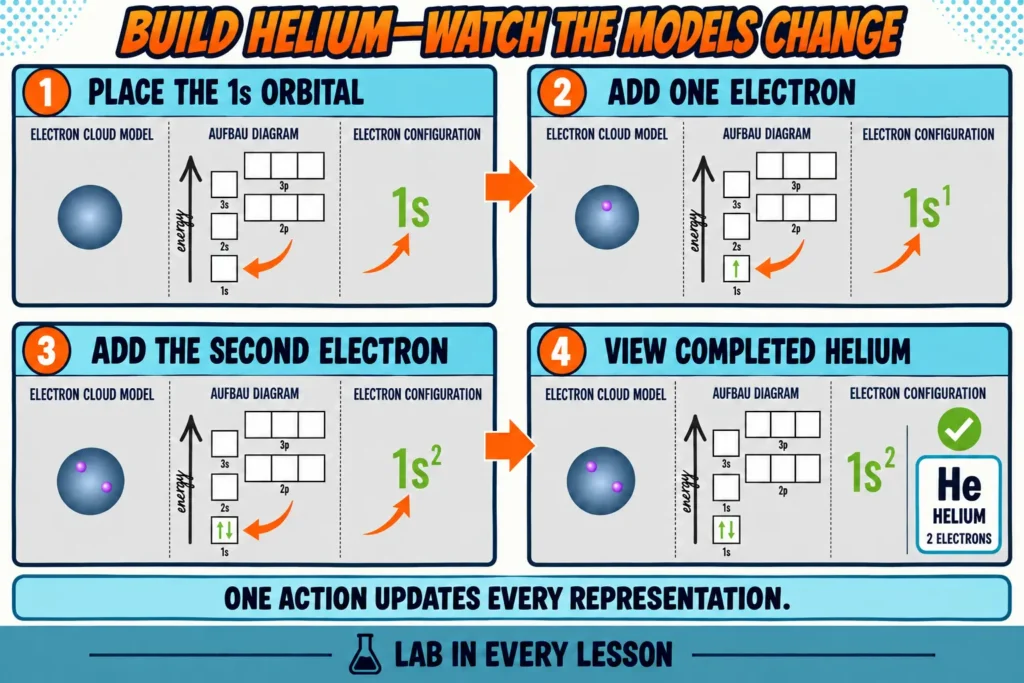
When students place the 1s orbital, the electron configuration begins with 1s. When they add the first electron, an arrow appears in the 1s box and the superscript changes. The second electron completes helium across all three representations.
Students aren’t just copying the orbital diagram from an example or translating a configuration they were given. They are creating the conditions that cause each representation to develop.
The simulation then connects the completed model to prior knowledge: helium has an atomic number of two, so a neutral helium atom contains two electrons. Those electrons occupy the 1s orbital. The same arrangement is visible in the spatial model, box diagram, and electron configuration.
Use Constraints to Direct Attention Without Giving Away the Pattern
The tool limits what students can do next. After filling 1s, they cannot skip directly to a 2p orbital. The available actions guide them toward 2s. As the atoms become larger, students must continue selecting orbitals and placing electrons in an order that produces a valid model.
The new version doesn’t provide all the same corrective feedback as the original simulation. In some places it redirects or autocorrects rather than asking students to resolve every possible mistake. Since students aren’t able to follow through on every change they want to make, this creates an additional level of guidance to the inquiry experience.
But the essential student action remains the same!
- Students still build instead of copy.
- They still experience the sequence repeatedly.
- They still have evidence from which to infer the rules.
That tradeoff is important. Inquiry doesn’t need to be all-or-nothing. A useful scaffold can reduce the critical thinking while preserving the action and sensemaking that carry the lesson’s purpose. This is what makes inquiry-based activities so easy to modify for all classrooms and learners.
Increase Complexity One Atom at a Time
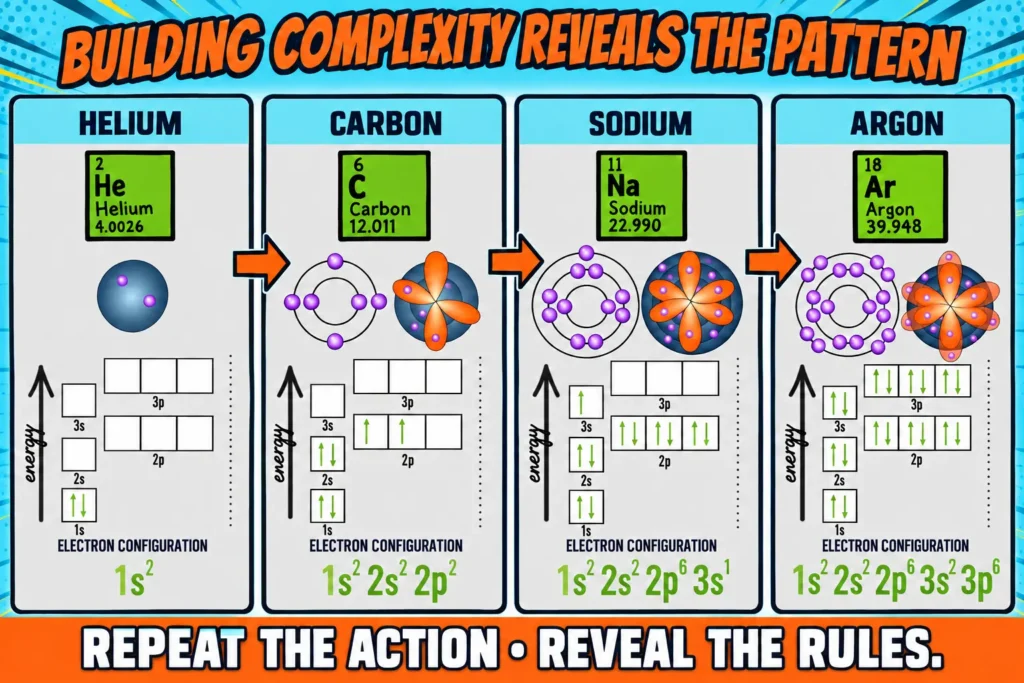
After helium, students move to carbon, then continue to larger atoms such as sodium and argon. The instructions expand only when the task requires a new action: continue adding electrons and add another orbital when more electrons are needed.
With each atom, students see the same relationships repeated at a larger scale. They watch orbitals fill from lower to higher energy, see that individual orbitals hold two electrons, and observe how electrons occupy a set of equal-energy orbitals before pairing.
This is where the crosscutting concept of patterns becomes especially important. Students aren’t simply completing several versions of the same task. They’re using what repeats and noticing what changes as the atoms become more complex. Those patterns help them predict what should happen next and explain the rules that govern electron configurations.
By the end, the familiar rules aren’t arbitrary statements at the top of a notes page. They summarize patterns students have already acted out, observed, and used.
How the Updated Simulation Changed the Electron Configuration and Orbital Diagram Lesson Design
The largest improvement is not visual. The new simulation made it possible for me to significantly reduce teacher talk time and maximize student sensemaking.
I no longer need to deliver a mini lecture explaining what an orbital diagram is, how its hierarchy works, or how an electron configuration is constructed. I still bring attention to those terms and representations students will encounter, but I don’t explain the patterns I intend for them to discover.
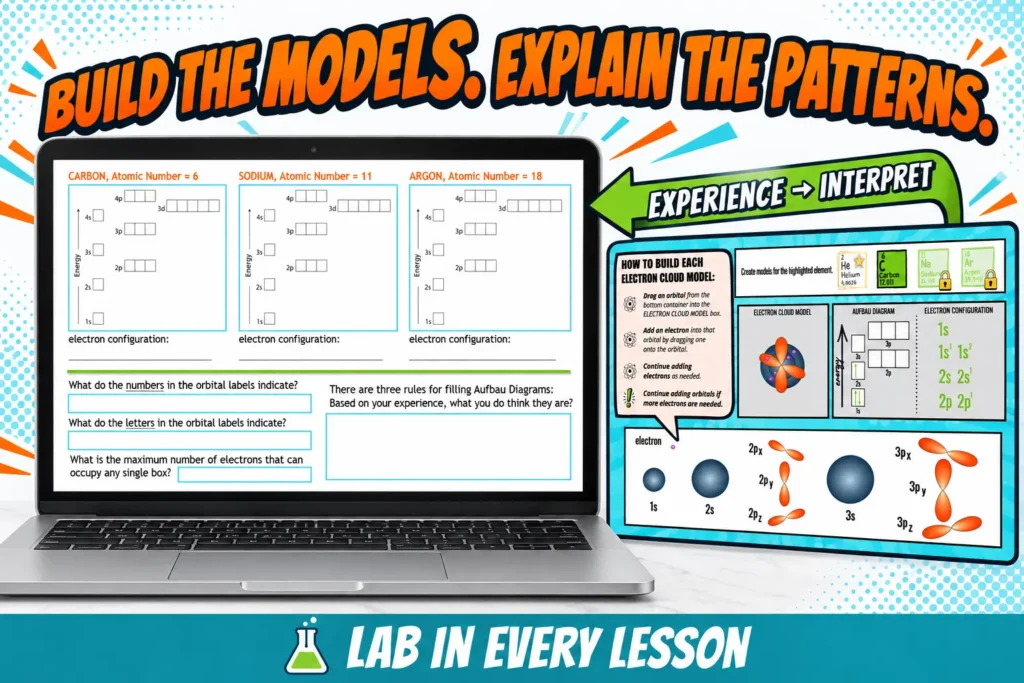
The student artifact didn’t change at all! Students still document selected orbital diagrams and electron configurations. They still prepare for the whole-class sensemaking questions:
- What do the numbers in an electron configuration indicate?
- What do the letters indicate?
- What patterns did you notice as the orbitals filled?
- What rules would someone need to follow without the interactive tool?
Having copied the models into their notes, students first consider those questions independently or with a partner before returning to the whole group to check understanding.
Only after students have collected the evidence and can cite it we name the named patterns: lower-energy orbitals are filled first (Aufbau Rule), each orbital holds two electrons (Pauli Exclusion Principle), and equal-energy orbitals receive one electron each before electrons pair (Hund’s Rule).
Support Students Without Removing the Inquiry
My students need explicit directions, visible progress, and enough structure to begin without shutting down. Designing with those needs in mind didn’t require me to replace the investigation with a demonstration.
The updated electron configuration activity includes:
- short instructions beside the workspace
- one new action introduced at a time
- visual feedback when students make a permitted or unhelpful move
- a required sequence that prevents students from advancing too quickly
- connections to familiar ideas such as atomic number and neutral atoms
- a predictable progression from a small atom to more complex examples
Those supports make the task more manageable without doing the thinking for students. Students still manipulate the models, recognize repeated relationships, and explain what the patterns mean.
This is exactly the balance I am always trying to achieve in my lesson design: remove barriers that prevent students from entering the experience without removing the action that makes the experience worth having.
Embed the Genially Simulation in a Complete Digital Lesson
The simulation can stand on its own during a live lesson, but I also need students to access the complete learning sequence asynchronously for days when I’m out of the classroom, individual students are out of the classroom or in the event of surprise circumstances requiring flexible learning solutions.
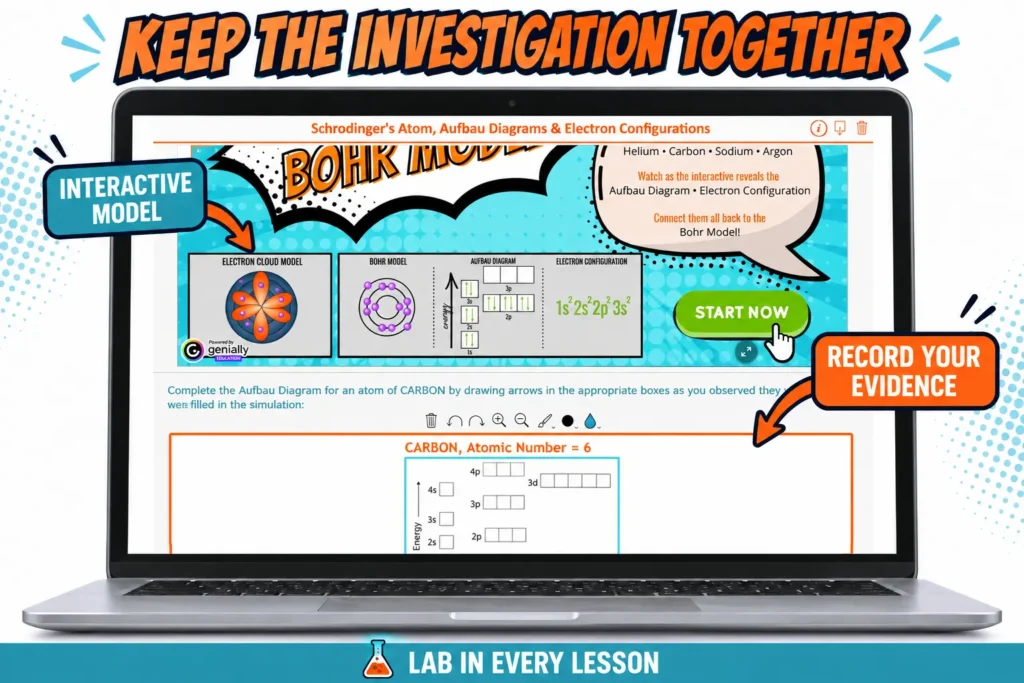
I deliver that completely asynchronous lesson version using an edtech product called BookWidgets. Each of my Bookwidget digital notebooks includes the learning goals, an activation of prior knowledge, the interactive experience, places to document observations, and questions that guide students from action to conclusion. A recent update to BookWidgets has enabled me to embed this new electron configuration simulation I created using Genially, allowing students to interact with the simulation and record their evidence within the same digital lesson rather than continually switching tabs.
What to Do When a Science Simulation Disappears
You don’t need to become a programmer every time a website stops working. You also don’t need to rebuild every resource you wish were slightly better.
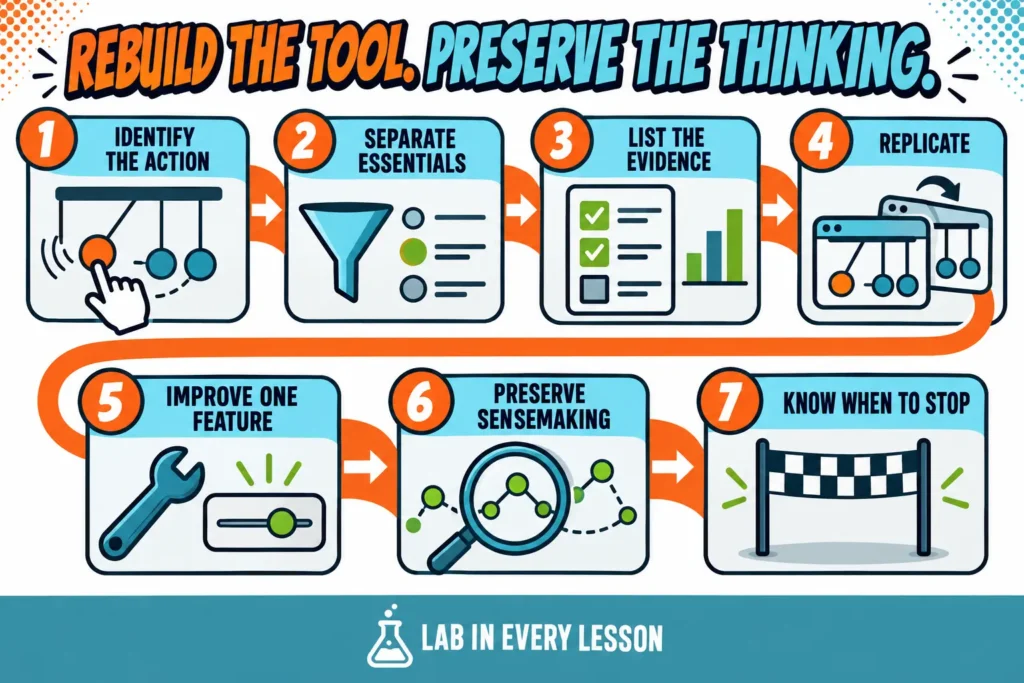
Use this process when the missing tool supports a lesson you value and no reasonable alternative preserves the same student action:
- Identify what students did with the original resource, not merely what appeared on the screen.
- Separate essential actions from features that were attractive but instructionally optional.
- List the representations, evidence, feedback, and constraints students need.
- Replicate a familiar structure before attempting to invent an experience from nothing.
- Add the one missing feature that would make the tool fit your students and lesson more completely.
- Keep the artifact and sensemaking prompts in your lesson focused on what students should infer from their actions.
- Stop building when an available tool already does the instructional job well enough.
That final step deserves emphasis. Once you discover that you can build interactive science simulations and tutorials in Genially, you just might want to make something there for every one of the lessons in your course! But, we know well our limiting reagent . . . teacher time!
The best first project is often something you already use and understand. Replicate the useful parts, improve one persistent limitation, and learn the platform while solving a real classroom problem.
Use This Electron Configuration Activity in Your Classroom
The complete Electron Configuration and Orbital Diagrams Inquiry-Based Lesson gives you everything you need to teach this concept without beginning with a procedure-heavy lecture. Students build the models, record what they notice, identify the patterns, and use those patterns to make sense of the rules. The updated virtual experience, student artifact, sensemaking questions, and digital delivery materials are all ready to use.
But electron configuration doesn’t have to be the only lesson in which students learn chemistry by doing chemistry.
Beyond the Beaker brings this same approach to your entire chemistry course! Instead of piecing together isolated activities or falling back on lecture every time you begin a difficult concept, you’ll have a complete sequence of truly 3-dimensional digital, inquiry-based lessons that ask students to build models, analyze evidence, recognize patterns, and explain what they’ve figured out.
You won’t just get a collection of activities. You’ll get a year-long curriculum designed around a consistent instructional approach so that students build confidence thinking through concepts on their own, you don’t have to redesign every lesson yourself, and inquiry becomes the way your chemistry class works.
Check out all the lessons that are included by downloading the Storyline Snapshot!